Running quantum circuits on real IBM hardware from n8n
I built an open source n8n node for IBM Quantum and ran a Bell state on a real 156-qubit processor. The full loop, the transpilation gotcha, and why n8n.

Over the past week I built a small open source tool that runs a quantum circuit on real IBM hardware as a step inside an n8n workflow. You write a circuit, an automation picks a quantum processor, the job runs on real qubits, and the measurement counts flow back into the rest of your pipeline.
This post is the full account. What the result actually was, how the node is built, why I reached for n8n instead of Make or Zapier, the exact loop from end to end, and the one step that quietly breaks most first attempts. I have kept it honest. Where a shortcut is more fragile than it looks, I flag it.
The result came back from a real 156 qubit processor
I ran the smallest interesting quantum circuit, a Bell state. Two qubits, one Hadamard, one controlled NOT, then a measurement of both. In theory it produces a perfectly correlated pair: every shot should read either 00 or 11, and never 01 or 10. On paper the state is (|00⟩ + |11⟩)/√2.
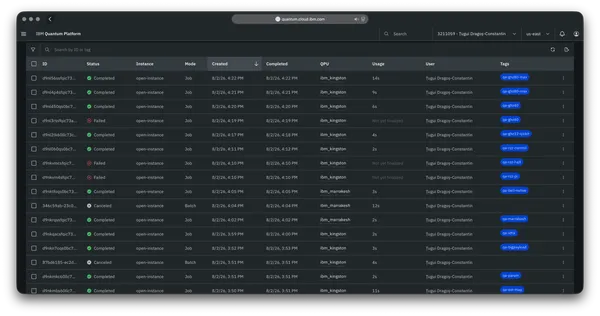
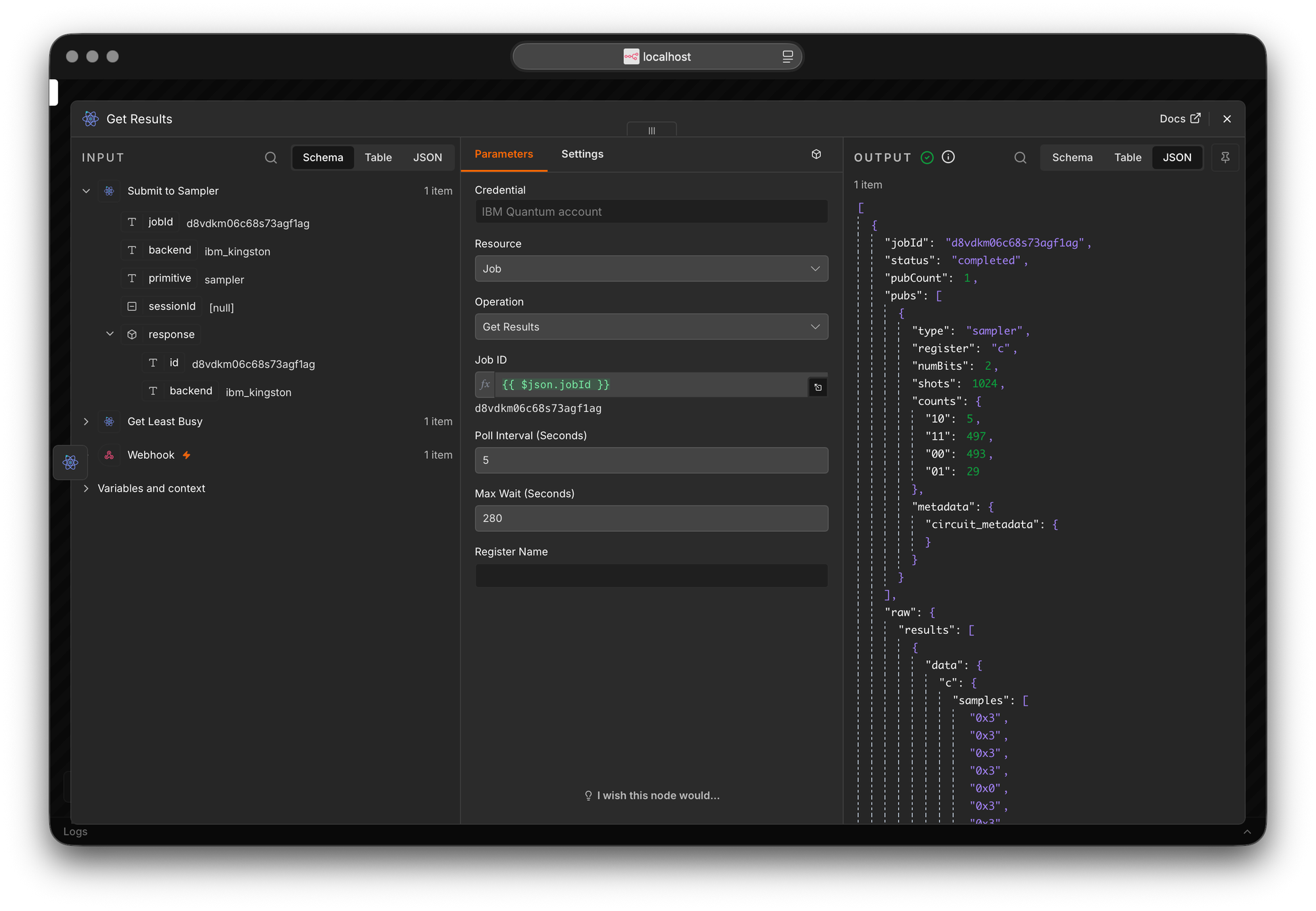
The job ran on ibm_kingston, a Heron r2 processor with 156 qubits, for 1024 shots. The counts came back like this:
- 00: 493
- 11: 497
- 01: 29
- 10: 5
So 990 of 1024 shots, about 97 percent, landed on the correlated 00 and 11 outcomes. The remaining 3 percent landed on 01 and 10, which the ideal circuit should never produce.
That 3 percent is the interesting part. It is not a bug in the node or in the circuit. It is the hardware showing through. A real quantum processor has readout error, gate error and a little decoherence, and on a near-term device that error floor is exactly what leaks into the forbidden outcomes. An ideal simulator would have returned a clean split with nothing in 01 or 10. Be careful with how far that gets you, though. A noisy simulator can reproduce a distribution like this one, so the counts on their own do not prove which machine ran the job. What proves it is the job record: the backend name and the job ID that IBM returns with the result, which you can open in the console afterwards. The error floor is consistent with hardware, and the job record is the receipt.
The node is a thin wrapper, not a Qiskit bundle
When I went looking, there was no n8n node for IBM Quantum, so I wrote one. It does not contain Qiskit. It does not contain any quantum library at all. It is a thin wrapper over the IBM Quantum Platform REST API, with zero runtime dependencies.
That constraint was forced and then turned out to be a feature. Verified n8n community nodes are not allowed to ship runtime dependencies, so bundling Qiskit was off the table from the start. Instead the node speaks to Qiskit Runtime directly over HTTP. It exchanges your IBM Cloud API key for a short-lived token, sends the circuit as an OpenQASM 3 string, polls the job, and parses the result. Circuits go in as plain text, counts come out as plain JSON.
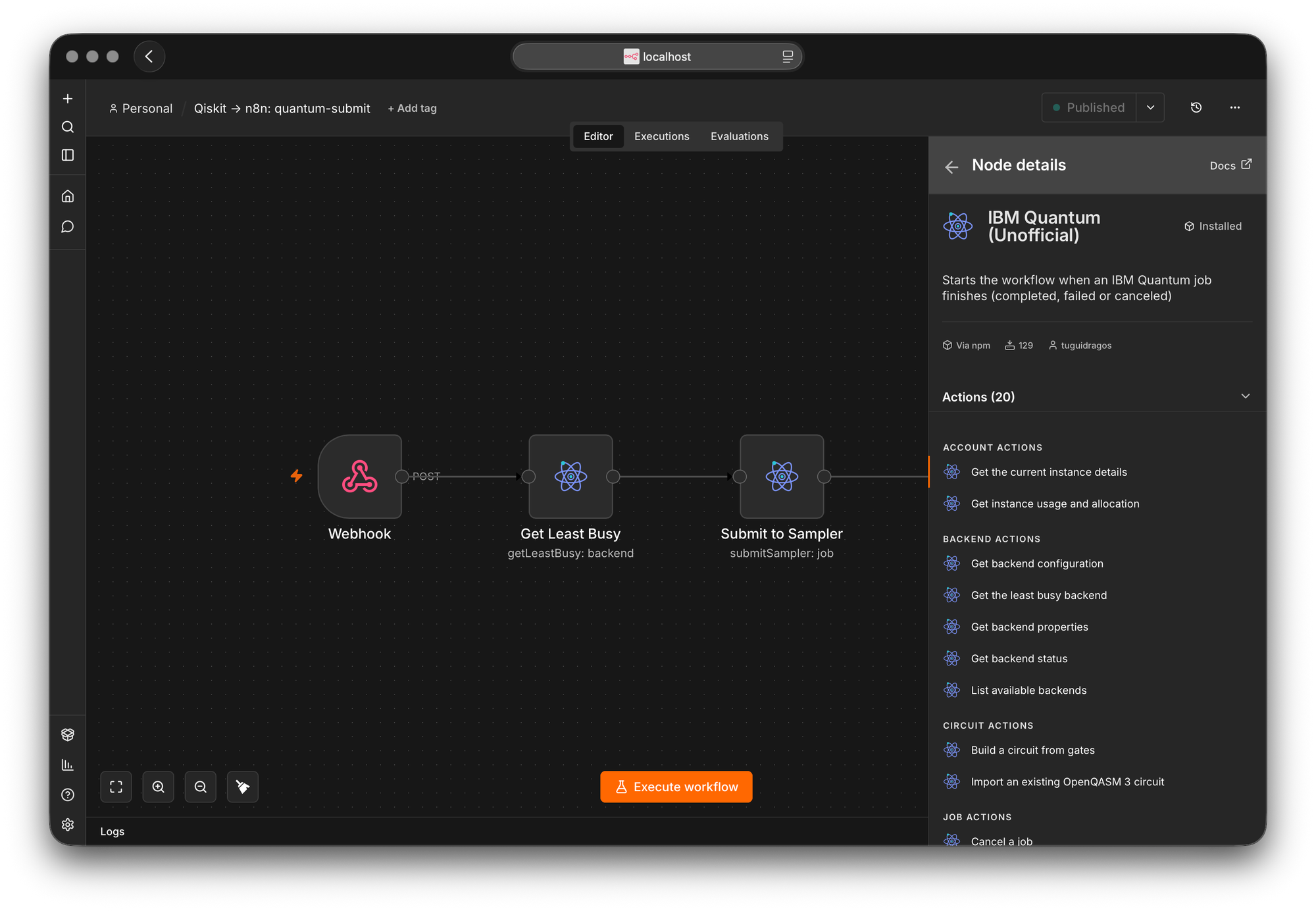
Inside n8n it shows up as one node with five resources and around twenty actions:
- Backend: list devices, read configuration, properties and status, and pick the least busy one.
- Circuit: build an OpenQASM 3 program from a list of gates, or import one you already have.
- Job: submit to the Sampler, which returns counts, or the Estimator, which returns an expectation value, check status, get results, list, cancel and delete.
- Session: open a batch or dedicated session for hybrid loops, then close it.
- Account: read your usage and your instance allocation.
It also ships two triggers, one that fires when a job finishes and one that fires only when a job fails or is cancelled.
Automation is the point, and quantum is now just an API
Here is the shift that made this worth building. Access to quantum hardware today is an API. Qiskit Runtime is a REST service underneath the Python SDK. The moment something is an API, it can be a step in a workflow, and the moment it is a step in a workflow, all the ordinary automation patterns apply to it.
That is what the node unlocks. You can submit a circuit on a schedule or in response to a webhook. You can let an automation choose the least busy processor instead of hard-coding one. You can fan the results into a database, a notification, a spreadsheet or a dashboard. You can retry on failure, or fall back to a simulator. You can run a hybrid loop that submits, reads, adjusts and submits again. The quantum computer stops being a special place you visit inside a notebook and becomes one node among many in a pipeline.
I want to be precise about what this is and is not. This is not quantum advantage, and it is not a production quantum workload. It is plumbing. The interesting thing is only that the plumbing now reaches real qubits, and that you can wire it up by dragging boxes around.
Why I chose n8n over Make and Zapier
People ask why n8n and not Make or Zapier, so here is the honest reasoning for this specific project. The three tools are not really built for the same job, so it helps to say what each one is before saying why I picked one.
Zapier is the most locked-down of the three and the friendliest to beginners. It is cloud only, it has only a limited code step, and it prices per task, so a long-running poll gets expensive quickly. It is built to connect ready-made apps with as little friction as possible.
Make is the strongest visual builder. It handles branching and data shaping well and has a large catalogue of connectors, but it is also cloud only, it prices per operation, and its custom apps live inside Make and are defined through its own builder rather than published as open packages.
n8n is fair-code, self-hostable, and friendly to real code. It exposes proper expressions and a code node, and its community nodes are open npm packages written in TypeScript.
For this project, that last difference decided everything. Here is what it meant in practice.
I could own the integration. An n8n community node is an npm package that I published and that anyone can read, install and verify, and n8n runs a verified community node registry where an independent node can be discovered. Neither Zapier nor Make lets an outside developer publish an open, inspectable integration as a standalone package. The entire point of this project was a public, timestamped artifact, and only n8n let the integration itself be that artifact.
I could self-host it. n8n runs on my own machine, so I owned the runtime from end to end. Zapier and Make are cloud only, which matters more than usual when you are wiring up an API with real credentials and jobs that touch real hardware.
The cost model fit long jobs. A hardware job can sit in a queue for minutes or hours. Zapier charges per task and Make charges per operation, so polling a job to completion burns paid actions either way. A self-hosted n8n has no per-action cost, so a trigger that quietly polls every minute until a job finishes is free.
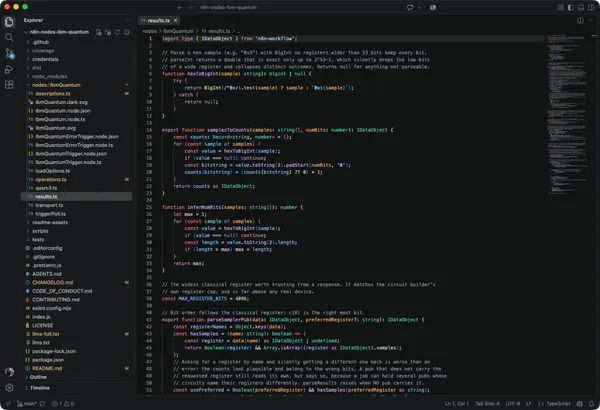
I could drop into code where I needed it. Turning the hex samples from the device into a counts histogram is a few lines of code in n8n. On Zapier that kind of work is awkward, and on Make it is a fight with a visual builder.
To be fair to the other two, this is not a verdict that n8n is better in general. If you are not technical and you want to connect Gmail to a spreadsheet in five minutes, Zapier is the right tool. If you want a polished visual builder with strong data handling and a large connector catalogue, Make is excellent. The choice here was driven by this being a developer-first, self-hosted, open source project, and for that shape of work n8n fit and the other two did not.
The full loop, from VS Code to real qubits
Here is the path the way I actually run it.
First, I build and transpile the circuit in VS Code with Qiskit, then send it to an n8n webhook. Note one thing here. The script transpiles the circuit for a specific processor, but it does not get to decide where the job runs. The script is small and carries no credentials, since the API key lives inside the n8n credential and not in the code:
import requests
from qiskit import QuantumCircuit, qasm3
from qiskit.transpiler.preset_passmanagers import generate_preset_pass_manager
from qiskit_ibm_runtime.fake_provider import FakeFez

N8N_WEBHOOK = "http://localhost:5678/webhook/quantum-submit"
BACKEND = "ibm_fez"
SHOTS = 1024

def build_circuit() -> QuantumCircuit:
    qc = QuantumCircuit(2, 2)
    qc.h(0)
    qc.cx(0, 1)
    qc.measure([0, 1], [0, 1])
    return qc

def to_isa_qasm(qc: QuantumCircuit) -> str:
    backend = FakeFez()
    isa = generate_preset_pass_manager(optimization_level=1, backend=backend).run(qc)
    return qasm3.dumps(isa)

qc = build_circuit()
qasm = to_isa_qasm(qc)
resp = requests.post(N8N_WEBHOOK, json={"qasm3": qasm, "backend": BACKEND, "shots": SHOTS}, timeout=320)
print(resp.json())
So the script picks a backend for transpilation only. Choosing where to actually run is the workflow's job.
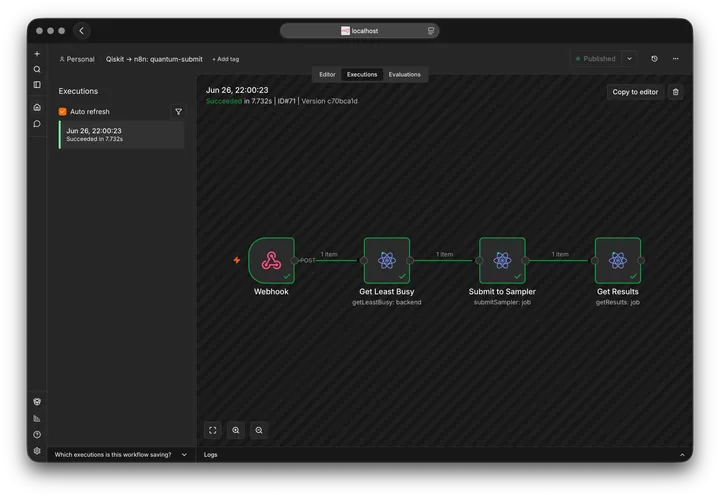
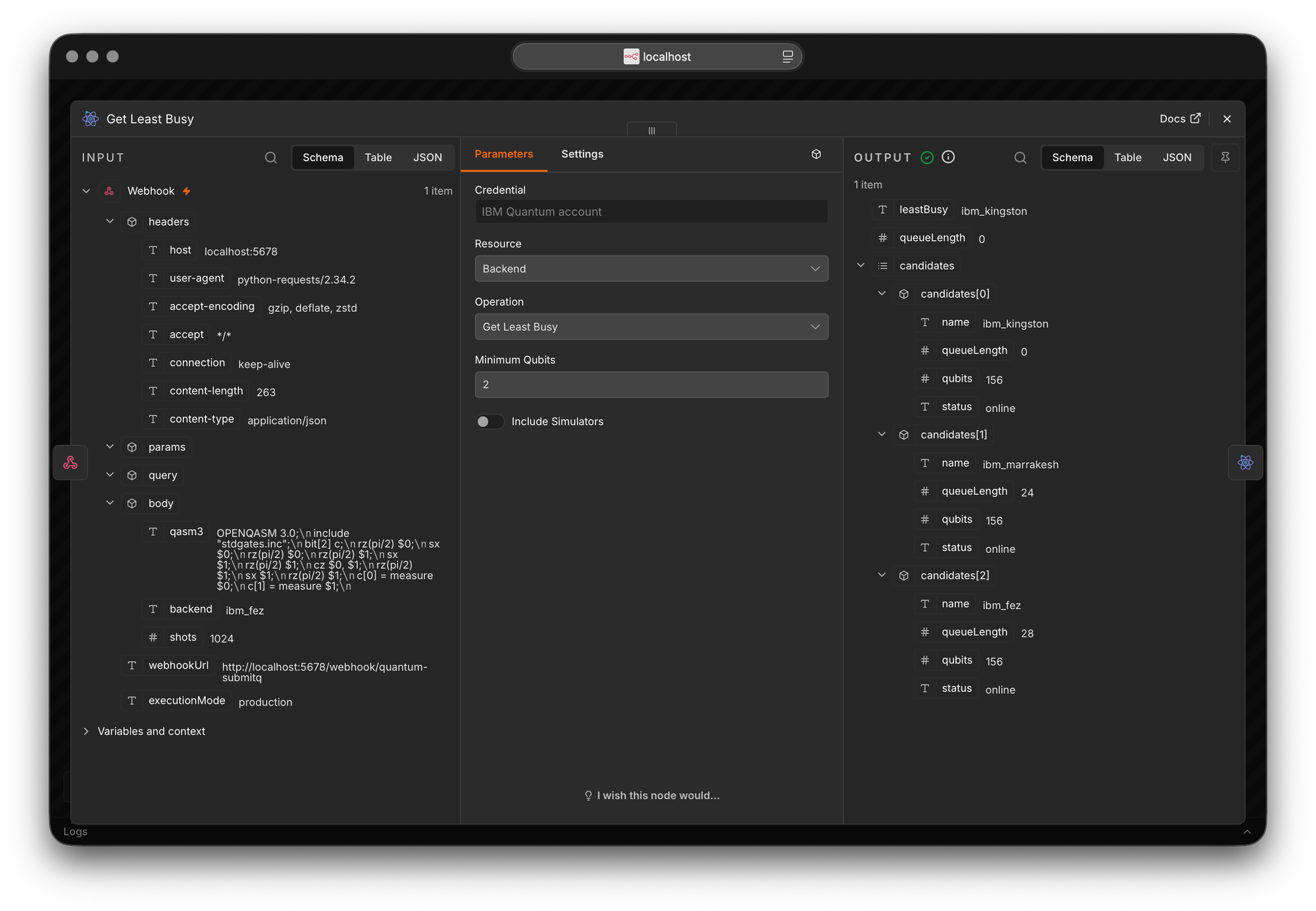
Second, the webhook hands the circuit to the workflow, and this is the part I want to highlight. I do not hard-code a machine. The Get Least Busy node looks at every processor available on my plan, ranks them by queue length, and returns the freest one. On this run that was ibm_kingston, sitting at an empty queue:
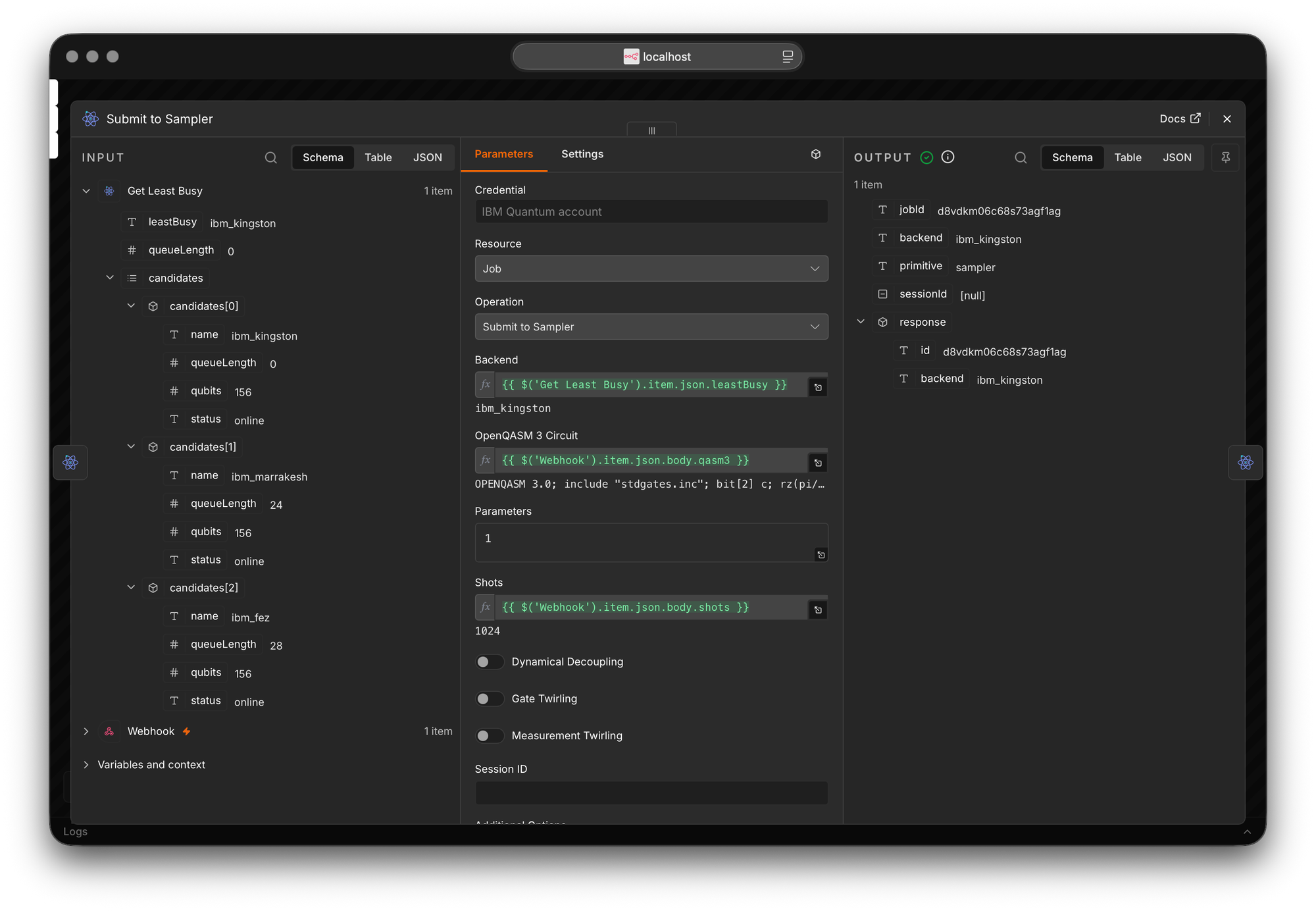
Third, Submit to Sampler sends the circuit to whichever backend Get Least Busy returned, not the one named in the script, and gets back a job id immediately, without blocking. This works because every processor on my plan is the same Heron family, so a circuit transpiled for one is valid on another, a point I come back to below:
Fourth, a later step waits for the job and reads the counts once it is done. For a short job you can poll inline. For a long hardware queue the healthier pattern is to let the submit finish on its own and use the trigger that fires when the job completes, so nothing holds an execution open for an hour.
That is the loop. Qiskit on one side, real qubits on the other, n8n in the middle.
Transpilation is the step everyone misses
This is the part that quietly breaks most first attempts, and it is worth understanding because it is not obvious.
A textbook circuit uses high-level gates like h, the Hadamard, and cx, the controlled NOT. A real quantum chip does not run those directly. Each processor executes only a small set of native gates. A Heron processor like ibm_kingston, for instance, runs rz, sx, x and cz, plus measure and reset, and its qubits are wired in a fixed layout. Translating a circuit into a device's native gates and connectivity is called transpilation, and the result is an ISA circuit, where ISA stands for instruction set architecture.
The Qiskit Runtime REST API does not transpile for you. It expects an ISA circuit and rejects anything else. Submit a raw Hadamard to real hardware and the job fails with reason code 1517 and a message like this:
The instruction h on qubits (0,) is not supported by the target system.
Transpile your circuits for the target before submitting a primitive query.
This is not a node bug. The node builds, submits and reads the job correctly. The hardware simply refuses a circuit that is not in its own gate set.
The fix is to transpile locally with Qiskit before sending. You do not even need live credentials for this, because a fake backend carries the real topology and native gate set:
from qiskit.transpiler.preset_passmanagers import generate_preset_pass_manager
from qiskit_ibm_runtime.fake_provider import FakeFez

backend = FakeFez()
isa = generate_preset_pass_manager(optimization_level=1, backend=backend).run(qc)
A Bell circuit transpiled for a Heron device comes out in native gates only. The abstract Hadamard and controlled NOT are gone, replaced by rz and sx rotations and a cz:
OPENQASM 3.0;
include "stdgates.inc";
bit[2] c;
rz(pi/2) $0;
sx $0;
rz(pi/2) $0;
rz(pi/2) $1;
sx $1;
rz(pi/2) $1;
cz $0, $1;
rz(pi/2) $1;
sx $1;
rz(pi/2) $1;
c[0] = measure $0;
c[1] = measure $1;
One detail worth stating plainly, since it follows directly from letting the workflow pick the backend. The script transpiles for one Heron processor, and the Get Least Busy node can then choose a different one. That is safe here because every processor on my plan is a Heron r2 and they share the same native gate set and the same layout of connected qubits, so an ISA circuit built for one is valid on another. It is not safe in general. If the freest device ever came from a different family with a different layout, the hardware would reject the circuit, so for anything beyond a same-family pool you should pin the backend you transpiled for.
What it does not do, and the honest caveats
A few things I want on the record, since calibrated is better than impressive.
This is near-term hardware, so noise is normal. The 3 percent of shots in the wrong outcomes is the device, not a defect. Expect error on any current quantum processor.
Transpilation is on you, not on the node. The node does not transpile. You transpile with Qiskit for one device, feed the node that ISA circuit, and pin the backend to that exact device, or at least to a device of the same family and layout, because an ISA circuit is specific to one topology.
Long jobs need the right pattern. A job that blocks an execution for an hour is fragile. Submit, then react to the completion trigger, rather than holding one run open.
The free plan has limits. The Open plan has a monthly time budget and cannot use dedicated sessions. The node exposes usage so you can watch the budget, but it cannot give you more of it.
How to try it
The package is on npm as n8n-nodes-ibm-quantum. On a self-hosted n8n you install it from the community nodes screen by entering that name.
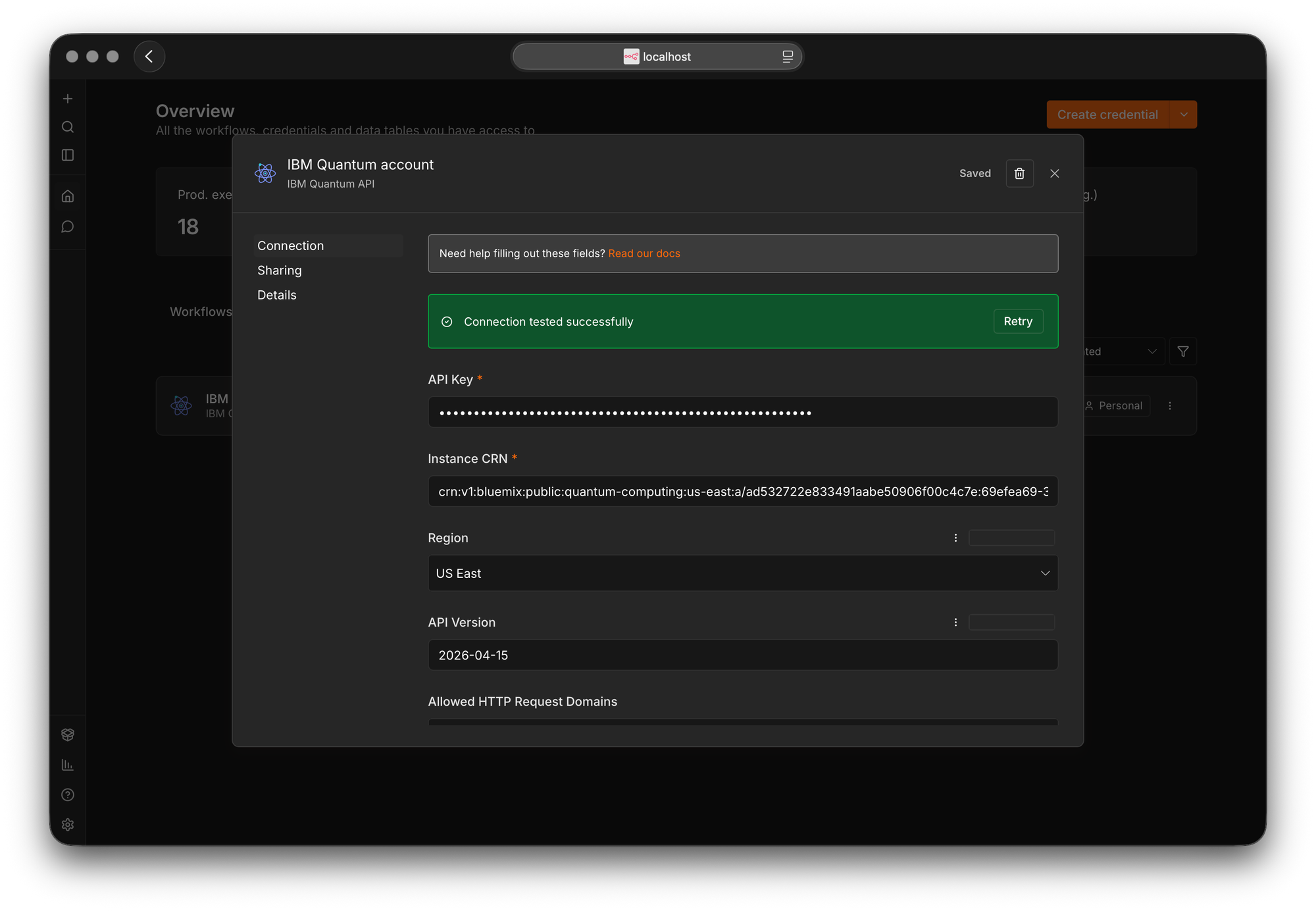
You will need an IBM Cloud account with access to the IBM Quantum Platform, an API key, and the CRN, the Cloud Resource Name, of your Qiskit Runtime instance. The credential in n8n has a test button that calls the backends endpoint, so you can confirm all of it at once before you run anything.
Why I built it
The reason I built this sits at an intersection I find under-explored: quantum computing and automation engineering. Most quantum tooling assumes you live in a notebook, and most automation tooling has never needed to reach a quantum processor. Putting the two together is a small thing today, a Bell state and some plumbing, but the plumbing is real and the qubits are real. That is the part I wanted to make concrete rather than talk about.
The node is open source, the result is reproducible, and the whole thing is dated in public on npm and in git. If you want to read the code or run the circuit yourself, the links are at the end.
Questions people ask
Can you run a quantum circuit from n8n? Yes. With this node you build or import an OpenQASM 3 circuit, submit it to the IBM Quantum Platform, and read the measurement counts, all as n8n steps. The circuit in this post ran on a real 156 qubit processor.
Does the node bundle Qiskit? No. It is a thin wrapper over the Qiskit Runtime REST API with zero runtime dependencies. You can still use Qiskit on your own machine to build and transpile circuits, then hand the result to the node.
Is it affiliated with IBM? No. It is an unofficial, community-built node. IBM Quantum and Qiskit are trademarks of IBM. The node even labels itself Unofficial inside n8n.
n8n, Make or Zapier for this kind of thing? For an open, self-hosted, code-first integration that you publish and own, n8n fit. Zapier is the better choice for quick, non-technical connections between ready-made apps, and Make is the better choice for polished visual workflows with strong data handling. They solve different problems.
Why did the circuit run on a different processor than the one I transpiled for? Because the workflow picks the backend, not the script. The Get Least Busy node returned the freest processor on the plan, and it happened to differ from the transpile target. That is fine here because both are Heron r2 devices with the same native gate set. For different hardware families, pin the device you transpiled for.
Links
- The code on GitHub: https://github.com/TuguiDragos/n8n-nodes-ibm-quantum
- The package on npm: https://www.npmjs.com/package/n8n-nodes-ibm-quantum
- The video demonstration: https://youtu.be/6ppR6uCt1_o