My IBM Quantum node for n8n is now live
Quantum and automation are my two threads. This node is where they meet. It is verified on n8n Cloud now, and installs straight from the canvas.

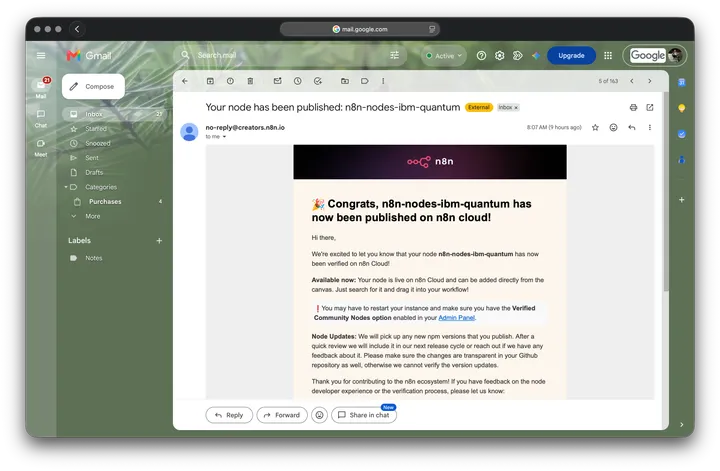
The email landed at eight in the morning. n8n had verified my community node for the IBM Quantum Platform and published it on n8n Cloud. From that moment, anyone on n8n Cloud, or on a recent self hosted instance, can open the editor, type Quantum into the node search, and wire the IBM Quantum Platform straight into a workflow.
This blog runs on two threads. One is quantum computing, which I am learning in public, one post at a time. The other is automation, which is the work I do with my hands every day. Until this node, they ran beside each other here without ever touching. This node is the first place they become a single thing.
The package ships three nodes
It is not one node bolted on. It is a small, deliberate set, and each one has a job.
- Build, run, and retrieve circuits. The main node talks to the IBM Quantum Platform. You hand it a circuit, it submits the job, and it brings the results back into the workflow as data you can read, branch on, or pass downstream.
- A trigger for finished jobs. Quantum jobs are not instant. This trigger starts a workflow at its first poll after a job finishes, whether it completed, failed, or was cancelled, so you never have to sit and poll for a status.
- A trigger for failures only. A separate error trigger fires when a job fails or is cancelled, and it hands you the failure reason and the error code. That is exactly what you want when you are building something that has to react to trouble on its own.
To use any of them you connect an IBM Quantum Platform credential, the same API key you would use from a Python notebook. Nothing exotic. If you can run a circuit from a script, you can run one from here.
You add it from the canvas, on Cloud and self hosted
Here is the part that makes this feel different from an ordinary community node.
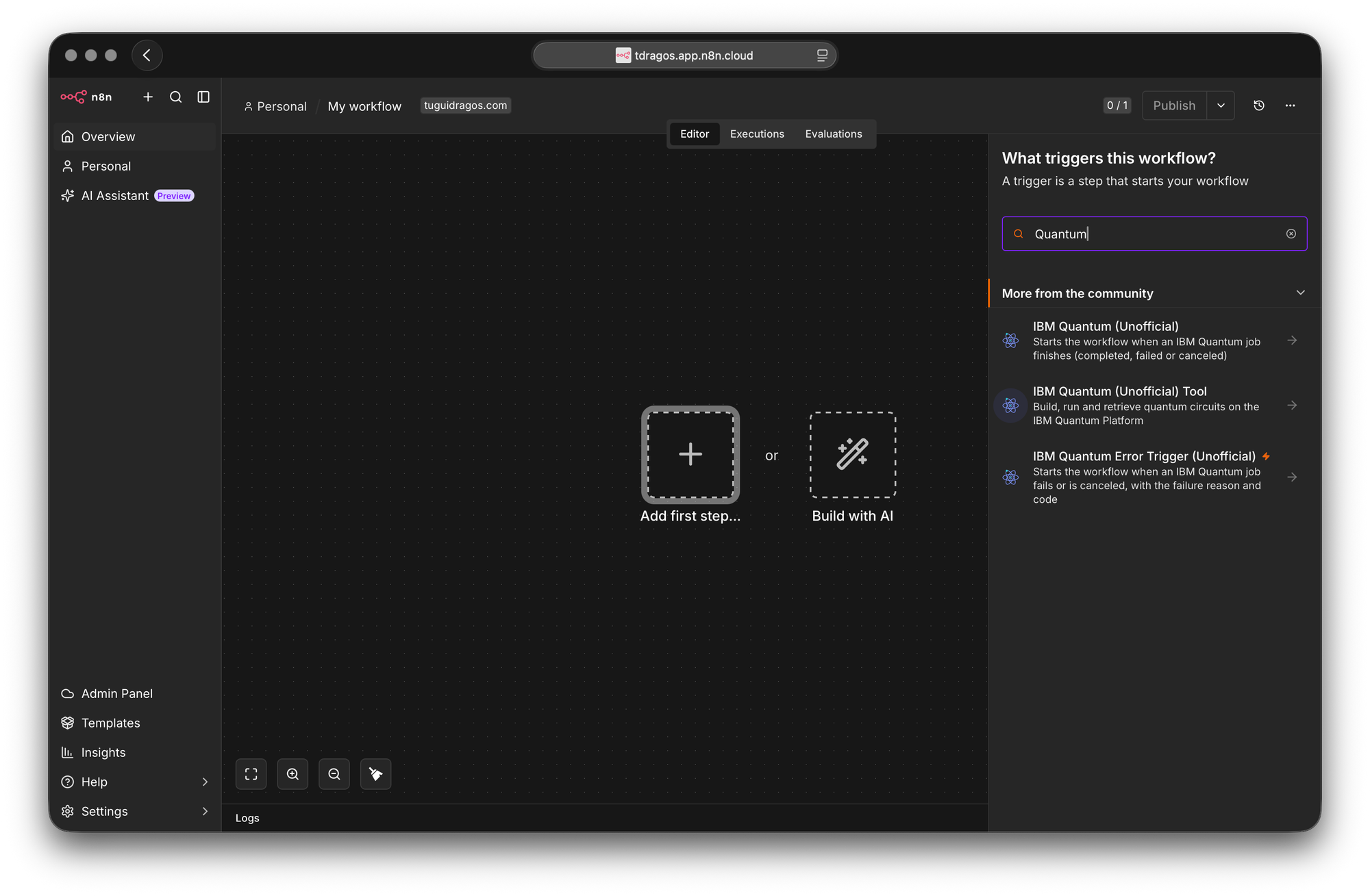
Installing an unverified community node meant going into Settings, typing the npm package name by hand, and accepting a warning that you were about to run unverified code from a public source. A verified node skips all of that. You open the nodes panel on the canvas, type what you are looking for, and if there is a match it shows up under a More from the community section. One click installs it for the whole instance, and from then on it behaves like any built in node: search, drag, drop, connect.
This works in both worlds. On n8n Cloud the node is there as soon as verified community nodes are enabled in the Admin Panel. On a self hosted instance the same one click flow works once you turn the feature on and run a recent enough version of n8n, 1.94 or later. To be precise about it, the node does still install, it is not magically already present, but you never leave the editor and you never touch npm. Only an instance owner can install it. After that, everyone on the instance can use it.
A quantum job is already a pipeline
It is fair to ask why a quantum computer needs to live next to your email nodes and your spreadsheets.
The answer is that running a quantum job already looks like an automation pipeline, even when you do every step by hand. You prepare a circuit, you submit it to a backend, you wait, you check whether it succeeded, and then you do something with the counts that come back. Submit, wait, branch on success or failure, act on the result. That is a workflow. n8n is an engine built for exactly that shape of work, which is why a trigger that fires when a job finishes and an error trigger that fires when one fails are not gimmicks. They are the natural joints of the thing.
I am not going to oversell it. We are in the NISQ era, the hardware is noisy, and nobody is running production workloads on a quantum backend today. But the plumbing around those jobs is real, and it is the kind of work that gets ignored because it is not glamorous. Quantum computing and automation engineering is a narrow strip of ground with very few people standing on it. This node is me planting a small flag there.
Unofficial is doing real work in that name
Every node in the package carries the word Unofficial, and that is deliberate. It is an independent, community built integration. It is not made by IBM, not endorsed by IBM, and not affiliated with IBM in any way. Verified means that n8n reviewed the node and let it into their trusted set, which is a statement about the node meeting their standards. It is not a statement from IBM about anything. I would rather be plain about that than borrow authority I have not earned.
Where it lives, if you want to try it
The package is published on npm as n8n-nodes-ibm-quantum. The source is open on GitHub, and the listing on my n8n Creator profile is public. If you run n8n, the fastest path is the one above: search the canvas, install, connect an IBM Quantum Platform credential, and you are building.
- npm: n8n-nodes-ibm-quantum
- GitHub: https://github.com/TuguiDragos/n8n-nodes-ibm-quantum
- n8n Creator profile: https://n8n.io/creators/tuguidragos/
Until this node, this blog kept quantum and automation in separate rooms. This is the door between them.